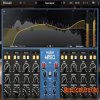
Существует множество мощных плагинов эквалайзера. Так почему же мы создали версию
MPEQ-1 с подключаемыми модулями?
Легендарный MPEQ-1 как аппаратное обеспечение делает то, что не под силу даже большинству цифровых эквалайзеров. Но, несмотря на многолетние просьбы внедрить его в мир плагинов, мы воздержались — потому что чувствовали, что если мы собираемся это сделать, то это должно привнести что-то действительно новое в цифровой мир. Точно так же, как аппаратный MPEQ-1 был беспрецедентен в аналоговой области, плагин должен был быть беспрецедентным и в цифровой.
Вот чего мы добились с помощью плагина
MPEQ-1 Superparametric Saturation Equalizer.
Плагин
Undertone Audio MPEQ-1 выполняет все функции аппаратного обеспечения: изменяемая форма, исключительно универсальные фильтры, широкий диапазон регулировки добротности, уникальный фазовый режим. Мы тщательно воссоздали все, что сделало оригинальный дизайн культовым.
Но плагин идет еще дальше. Каждый диапазон эквалайзера теперь имеет свою собственную выделенную ступень насыщения, что позволяет добавлять насыщенную гармоническую окраску от полосы к полосе. Повышайте свои высокие частоты до насыщенности, одновременно сокращая средние и оставляя низкие частоты чистыми. Нажимайте на клавиши малого барабана до тех пор, пока он не запоет, сохраняя при этом чистоту верхних нот. Такой способ управления поистине беспрецедентен.
Это новый вид эквалайзера, и после того, как вы поработаете с ним, вам будет трудно вернуться к нему.
Функции и элементы управления плагина
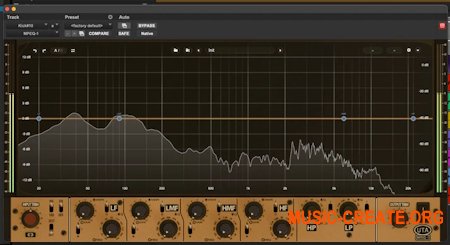
Undertone Audio MPEQ-1 такие же, как и в аппаратном обеспечении, с некоторыми важными дополнениями. Мы добавили совершенно новый раздел искажений; для каждого диапазона вы можете регулировать степень и стиль искажений. Мы также добавили красивый RTA с чрезвычайно высоким разрешением на низких частотах. Диапазонами эквалайзера можно управлять непосредственно на RTA с помощью привычных цифровых регуляторов параметров или с помощью графического изображения аппаратного обеспечения, приведенного ниже.
All notable changes to MPEQ-1 are documented in this file.
[1.0.3] — 2026-08-19
What's new
- Band control panel: one place to edit everything about the selected band
- Band solo: listen to a single band on its own via the headphones button or Alt+1-4
- Keyboard shortcuts for undo/redo, A/B compare, copy, bypass, panels and band select
- Mouse & Keys overlay listing every gesture and shortcut
- Grid-only view for a compact, curve-focused layout
- Distortion glow now follows the band's actual shape, showing where the drive lands
- Adjustable analyser floor, from -60 dB down to -130 dB
- Improved level meters with clip LEDs and peak readouts
- Redesigned settings panel, control bar and view icons
- Master distortion switch added to the EQ-only view
- Tooltips on the faceplate controls
- Fine adjust is now Ctrl / Cmd + drag or wheel on every knob
- Automation lanes show switch names instead of numbers, and follow the direction of the switch
- Much smoother on macOS with the visualiser open, and lower CPU use overall
Bug fixes
- The EQ curve now lines up exactly with its nodes across the whole spectrum
- Sharper, less smeared rendering at fractional UI scales
- The right-click menu now scales with the plugin's UI size
- The dB-axis lock is now remembered per instance and saved with your session, instead of resetting every time the plugin is reopened
- Pro Tools: presets now recall the switch positions and view state correctly, and the host's automation shortcut no longer changes grid bar buttons
[1.0.2] — 2026-07-08
What's new
- Sharp Retina/HiDPI rendering with new 2x graphics
- Updated knob designs
- Improved compact view: crisper control bar and mini meter, refined layout
- Snappier, more accurate DRIVE knob response
- Smoother, more efficient UI rendering
- Cleaner gain changes — no more zipper noise
- Faster, snappier auto dB range
- Locked dB scale for consistent metering
- Added distortion master switch and distortion panel visibility control
Bug fixes
- Fixed loud volume bursts when turning a band's DRIVE knob quickly
- Fixed occasional clicks/pops when starting or stopping playback (short output declick fade at transport edges, skipped during offline bounce)
- HPF/LPF Q now restores correctly on recall
- Fixed UI being cut off at the top on recall
- Fixed EQ grid hover readout
- Fixed clicks on playback start and across block boundaries (gain ramping)
- Tuned knob/node scroll and drag sensitivity
- Windows CI and licensing fixes
[1.0.1] — 2026-06-22
What's new
- Added spectrum analyzer, EQ response curve, and dynamic EQ grid
- Spectrum analyzer rendering improvements
- Improved Pro Tools UI render performance
Bug fixes
- Fixed resampled buffer overflow crash in Pro Tools
- AVX/Rosetta fixes
- A/B compare fixes
- Meter decay fix
- Thread-safety and use-after-free fixes
- Tooltips now update correctly when hovering inner/upper controls
[1.0.0] — 2026-05-31
- Initial release.
Внимание! У Вас нет прав для просмотра скрытого текста. Для получения доступа жми на кнопку ниже


Метки к статье: эквалайзер