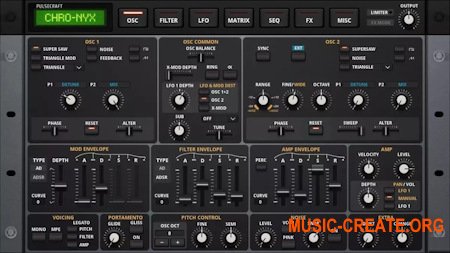
Сердце легендарного синтезатора JP-8080.
DNA это ОСНОВА полноценной синтезаторной стойки.
Все функции популярного синтезатора раннего аналогового моделирования, а также лучшие элементы таких легендарных инструментов, как Roland Jupiter 8, Access Virus, Nord Modular 2, Mono/ Poly и RADIAS.
Десятки генераторных движков, формирователей волн и эффектов. 5 стилей фильтров. Полная матрица модов.
Impact Soundworks Chro Nyx идеально подходит для аналоговой синтезаторной музыки 80-х, классического транса 90-х, современного EDM, цифрового хардкора.
Фирменный звук и магия аппаратного обеспечения за небольшую цену.
NFO
Note -
The Chro-Nyx.nicnt file needs to be added to your registry,
with the Kontakt library add tool. Otherwise Chro-Nyx will not work..
(Don't add with "Kontakt Portable" will not work)
----------------------------------------------------
Installation with Kontakt installed -
.Copy the Chro-Nyx folder & paste to where you keep your Reaktor Ensembles.
.Run the Kontakt library add tool & go to where your Reaktor Ensembles are,
then add the Chro-Nyx folder that contains the Chro-Nyx.nicnt file
----------------------------------------------------
Installation without Kontakt installed -
.Copy the Chro-Nyx folder & paste to where you keep your Reaktor Ensembles.
.Install the included Kontakt_Add_Library_Enabler_x64
.Run the Add Library desktop shortcut & go to where your Reaktor Ensembles are,
then add the Chro-Nyx folder that contains the Chro-Nyx.nicnt file
----------------------------------------------------
Reaktor v6.5.0+ required
Enjoy!
ohsie
The Chro-Nyx.nicnt file needs to be added to your registry,
with the Kontakt library add tool. Otherwise Chro-Nyx will not work..
(Don't add with "Kontakt Portable" will not work)
----------------------------------------------------
Installation with Kontakt installed -
.Copy the Chro-Nyx folder & paste to where you keep your Reaktor Ensembles.
.Run the Kontakt library add tool & go to where your Reaktor Ensembles are,
then add the Chro-Nyx folder that contains the Chro-Nyx.nicnt file
----------------------------------------------------
Installation without Kontakt installed -
.Copy the Chro-Nyx folder & paste to where you keep your Reaktor Ensembles.
.Install the included Kontakt_Add_Library_Enabler_x64
.Run the Add Library desktop shortcut & go to where your Reaktor Ensembles are,
then add the Chro-Nyx folder that contains the Chro-Nyx.nicnt file
----------------------------------------------------
Reaktor v6.5.0+ required
Enjoy!
ohsie
Сайт разработчика: https://impactsoundworks.com/product/chro-nyx/
Внимание! У Вас нет прав для просмотра скрытого текста. Для получения доступа жми на кнопку ниже